Introducing Leyway
Leyway is an agent workspace where everything agents build is code: the work they do now, the workflows that repeat it, and the artifacts that show the result.
Leyway is an agent workspace where everything is code. Agents write code to do work now, workflows to repeat it, and artifacts, such as pages and sites, to show the result.
Code is what models are best at writing, and what people can read, check, and run again. A chat transcript tells you what an agent did once. A program tells you exactly what will happen next time.
Take one request:
“Every hour, pull our Stripe payments and Brex spend, and give me a page with cash in and out.”
The agent answers it with three pieces of code.
1. Codemode: work now
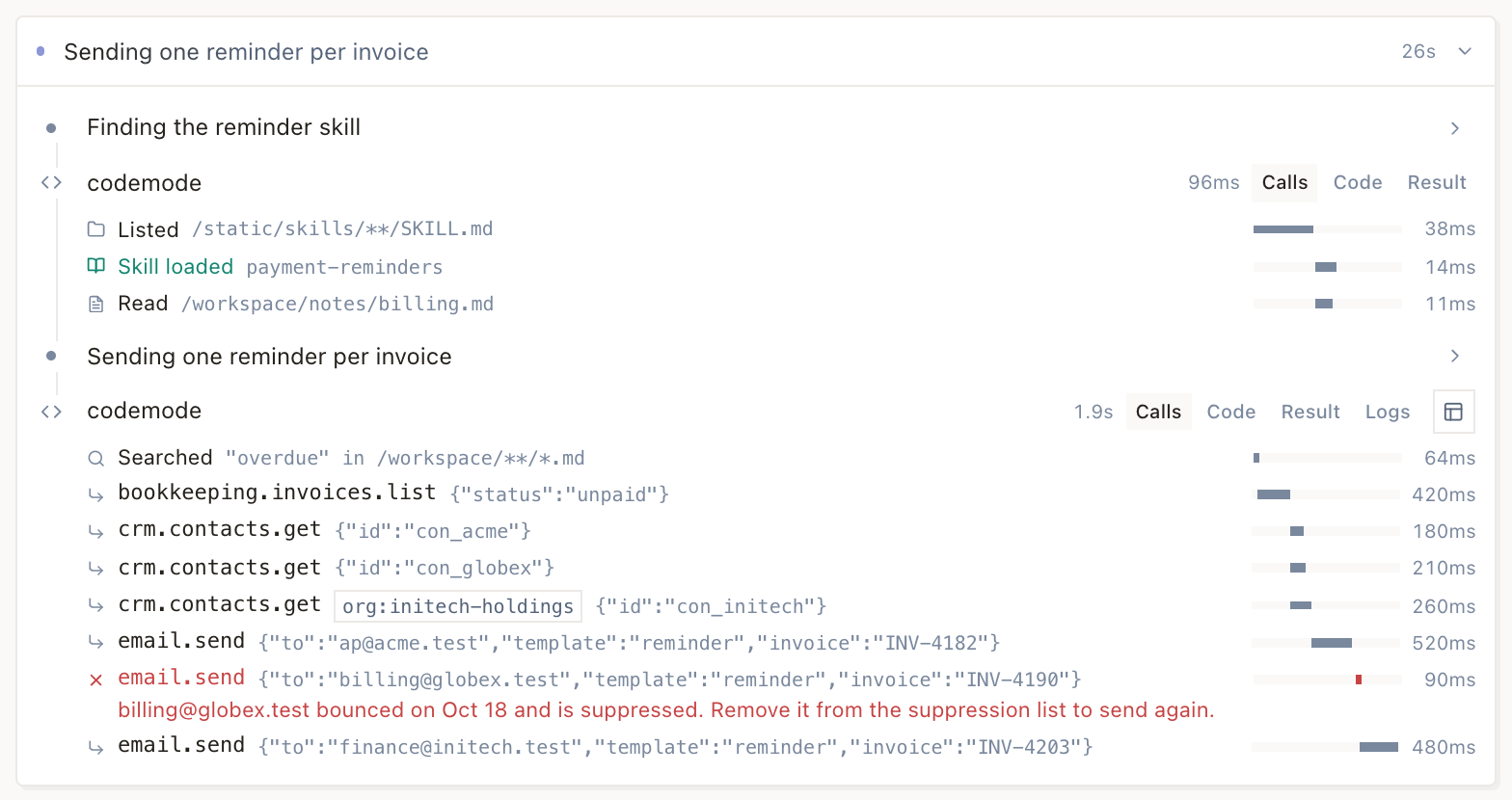
Leyway agents work in codemode. Instead of calling one tool per turn, they write a program, and Leyway runs it. Everything an agent can do in Leyway is described in TypeScript declaration files, which it reads before writing code.
To answer the request, the agent first looks at the data. Stripe and Brex are connected as HTTP
APIs, so each call goes through integrations, which adds the saved credentials:
const charges = await integrations.execute({
  connectionId: "api#stripe",
  actionId: "request",
  input: { method: "GET", path: "/v1/charges", query: { limit: 100 } },
});
const spend = await integrations.execute({
  connectionId: "api#brex",
  actionId: "request",
  input: { method: "GET", path: "/v2/transactions/card/primary" },
});

return {
  cashIn: charges.response.body.value.data.reduce((sum, c) => sum + c.amount, 0) / 100,
  cashOut: spend.response.body.value.items.reduce((sum, t) => sum + t.amount.amount, 0) / 100,
};
One program, two services, one turn. Paging, filtering, and adding up happen in code, not in the model’s context.
2. Workflows: work every time
A workflow is the same kind of code, saved to a file. Each step.do is durable: a run survives
restarts and retries without repeating finished steps. The agent adds a route that starts this
workflow every hour.
export default defineWorkflow({ name: "finance-feed" }, async (event, step) => {
  const charges = await step.do("fetch Stripe charges", async () => {
    const result = await integrations.execute({
      connectionId: "api#stripe",
      actionId: "request",
      input: { method: "GET", path: "/v1/charges", query: { limit: 100 } },
    });
    return result.response.body.value.data;
  });

  const spend = await step.do("fetch Brex spend", async () => {
    const result = await integrations.execute({
      connectionId: "api#brex",
      actionId: "request",
      input: { method: "GET", path: "/v2/transactions/card/primary" },
    });
    return result.response.body.value.items;
  });

  await step.do("record changes", async () => {
    for (const c of charges) {
      await events.fire({
        source: "stripe",
        eventType: "charge.changed",
        idempotencyKey: `${c.id}:${c.status}`,
        payload: { entityId: c.id, record: { amount: c.amount, status: c.status } },
      });
    }
    for (const t of spend) {
      await events.fire({
        source: "brex",
        eventType: "transaction.changed",
        idempotencyKey: t.id,
        payload: { entityId: t.id, record: { amount: t.amount.amount } },
      });
    }
  });
});
Firing an event with a key it has seen before stores nothing. A retried step or the next hourly run records only what actually changed: a new charge, or one whose status moved from pending to succeeded.
Leyway is event-based. Webhooks, schedules, email, forms, and Leyway itself emit events, and routes decide which events start which workflows. Workflows can sleep, wait for other events, and pause to show you a form when they need a decision.
3. Artifacts: show the result
Artifacts are code too. A page is a set of live SQL queries over your events and runs, bound to UI components. Each event above is keyed by its record’s ID, so the page reads every charge and transaction as it is now:
export default page.define({ title: "Cash in and out" }, ({ sql }) => {
  const totals = sql`
    SELECT source, sum(payload ->> '$.record.amount') / 100.0 AS total
    FROM event_state
    WHERE source IN ('stripe', 'brex')
    GROUP BY source
  `.columns({ source: "string", total: "number" });

  return ui.grid(
    { columns: 2, gap: "lg" },
    ui.each(totals, (row) =>
      ui.metric({ label: row.source, value: row.total, format: { currency: "USD" } }),
    ),
  );
});
Pin it to your dashboard. Its data syncs to your browser, so it loads from local data and updates as each run brings in new events.
When the result is for someone outside your workspace, the agent builds a site instead: a website made from files in your workspace, served at its own address, public or private. A site reads the same data, and can fire events of its own, such as a form submission that starts a workflow.
Code you can follow
Because every piece is code, every piece can be traced. Each event records what it caused: the routes it matched, the runs it started, each step, and where something failed. When the numbers on your page look stale, you can see why.
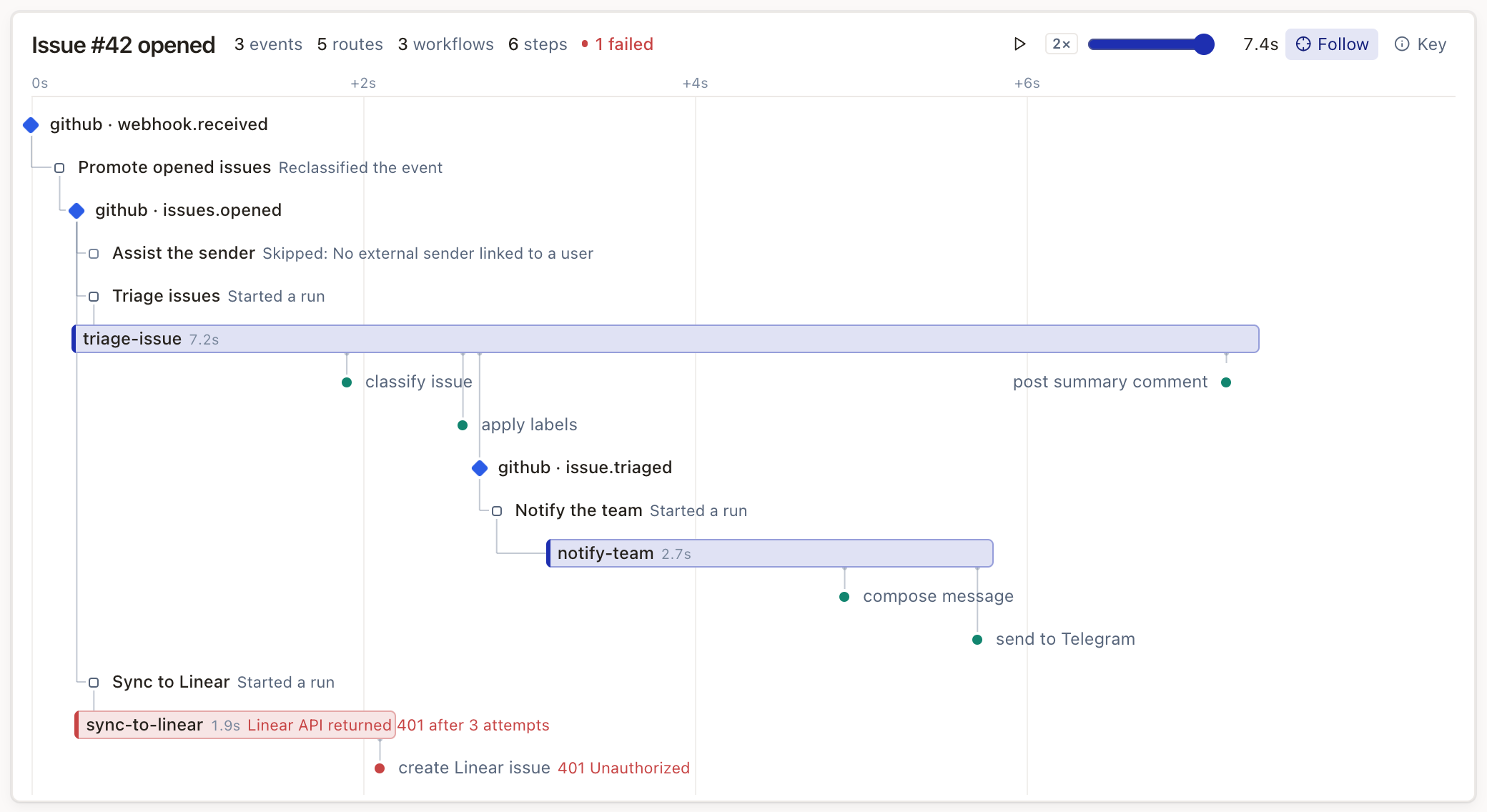
And because it’s all files in your workspace, you can ask an agent to change any of it: sync another service, add a chart, or send an email when spend crosses a threshold.
Also in the box
- Integrations with the services you already use: GitHub, email, MCP servers, and any HTTP API.
- Computers: sandboxed machines with a shell for agents and a terminal for you.
- A marketplace of packages that bundle workflows, routes, and agents.
- Organizations with projects, roles, and client management for agencies. Each workspace keeps its data in the EU or the US.
Sign up at leyway.com. We’d love to hear what you automate first on Discord.