How I use Git worktrees
My simple workflow built around a fixed pool of Git worktree directories.
Git worktrees have a reputation for being inconvenient. What works for me is having static worktrees. Instead of creating a new worktree for every task, I reuse a fixed pool of directories.
The other tips in this post follow from this main idea.
Keep worktrees in a fixed location
I store each project in ~/dev and its worktrees in a neighboring directory:
~/dev/my-project
~/dev/my-project.worktrees/
I usually maintain five to ten worktree directories for a project. The pool acts like a circular buffer: when I finish one task, I reuse its directory for another. The number of directories is arbitrary, but I find that it helps to align the number with my brain’s working memory.1
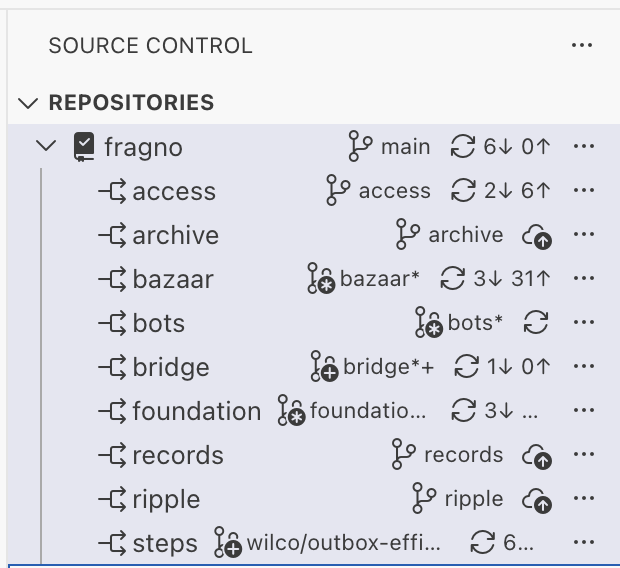
The names of these folders are arbitrary. In the VS Code window I currently have open, I see
directories named steps, bots, bazaar, foundation, access, and bridge. These vaguely
remind me of concepts within the project that these worktrees are for. Yet, they are not so specific
that I feel certain features have to be developed in certain worktrees. I find that these names help
me mentally map which features I’m working on in each tree.
Keep the main worktree clean
I reserve the main worktree as a stable checkout. Because it contains no unfinished changes, the
main worktree provides a reliable source for shared local files. This means I can easily cp an
environment file into a worktree when I set it up. When that file changes, I can distribute the
updated version from the main worktree to the others.
As a bonus, the stable checkout can also be used to demo the project without first cleaning up in-progress features.
Give each worktree isolated local state
Each worktree should be able to run the project without conflicting with the others. SQLite makes this straightforward because every worktree can keep a separate database file.
My recent projects run on Cloudflare Workers and use Durable Objects for persistence. During local
development, Wrangler writes SQLite state to the worktree’s .wrangler/state directory. As a
result, each worktree automatically gets independent local data.
PostgreSQL requires a little more setup, but the same principle applies. I create one database for
each reusable worktree name. The mental model of static directories helps when using psql to
inspect some data.
It is worth investing in seed data so that new worktrees can be easily set up. Reusing static directory and database names also means that a returning worktree does not always need to start with an empty database.
Let development servers select available ports
Each running worktree needs an available TCP port. Vite already handles this well enough for my
workflow: if port 5173 is busy, it selects the next available port.
I have considered assigning deterministic ports with 5173 + n, where n is the directory’s
position in a sorted list of worktree names. I have not needed that extra configuration yet.
Give each worktree its own editor window
I really like Ghostty, Superset, and Cursor, but none let me work in precisely the way I want. What has worked for me is using Visual Studio Code with the “Native Tabs” feature enabled on macOS. This makes it so that multiple windows open in the same physical space. VS Code has hotkeys for switching between these windows, which makes everything very convenient.
I also customize the window title so that each tab shows its folder and active branch:
  "window.nativeTabs": true,
  "window.title": "${folderName}${separator}${activeRepositoryBranchName}",
VS Code also has some basic worktree features, but they aren’t very good, so I mostly ignore them. I also do not use Copilot.
Instead, I run the Pi coding agent in an integrated terminal placed in the editor area, where files normally open. A keyboard shortcut helps me open a terminal there. VS Code is good at direct code navigation, finding references, etc. You know, the typical things that people who read code enjoy.
I have tried extensions that integrate Pi with VS Code, but they have not added much value. The exception is a small custom Pi extension that I put together myself. It lets the agent control the integrated browser, which helps with debugging.
Use tools that support worktrees
A separate node_modules directory for every worktree could consume a lot of disk space. pnpm
avoids duplicating most package contents by linking dependencies from its shared store. Using
regular old npm does not give you these benefits.
Turborepo provides a similar benefit for task outputs. Its cache lets worktrees reuse successful builds and tests across worktrees.
Obviously, these examples are specific to the JavaScript ecosystem, but I’m sure the same ideas apply to other ecosystems as well.
Conclusion
The key to my workflow is the fixed directory pool. Git worktrees do not need elaborate orchestration.
Footnotes
-
I do not actively use five to ten worktrees; some can remain dormant for a while. ↩